FTDX1200 Operating Manual Page 105

DATA (PSK) OPERATION

Previous Page    Index of Topics    Table of Contents    Index of Pages    Next Page

The FTDX1200 has a capabiltiy of a PSK decode function when the optional FFT unti is installed. You can easily synchronize by aligning the marker on the AF-FFT screen display, together with the decode screen while receiving a signal. Decoding with this transceiver supports both general BPSK and QPSK that have error correction functions.
PSK DECODE (WITH OPTIONAL FFT UNIT)


    1. Press the [MODE] switch, set the operating mode to "DATA USB".

ADVICE:
Press and hold the [MODE] switch for approximately one second to switch back and forth between "DATA USB" and "DATA LSB".

    2. Configure Menut item "069 DATA MODE" to "PSK", and "194 PSK MODE" to "BPSK" or "QPSK".

    3. Receive a PSK signal, press and hold the [SCOPE] button for one second or longer. The PSK DECODE screen displays, and the decoded text is displayed on the screen.

ADVICE:

Align the peak of the received signal with the marker of the AF-FFT screen.

If text is displayed due to noise and band clutter, when a PSK signal is not being received, turn the [VFO-B/CLAR] knob to adjust the threshold level.

* If you transmit content written to the PST text memory (page 106), the transmitted PST signal is displayed as text.
Note that transmitted text is displayed in white.


NOTE:
Cross talk, noise, phasing, and the like may prevent reliable decoding of the message.

If continuously sending for more than a few minutes or if sending time is longer than receiving time, reduce transmit power output to between 1/2 and 1/3 using Menu item "177 TX MAX POWER".

To cancel the PSK decode function, press and hold the [SCOPE] switch again for one second or longer.

End of "PSK Decode (with Optional FFT Unit)"


Threshold Level Adjustment

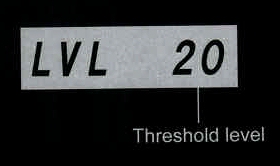
Scrambled text may be displayed due to noise and band clutter, when a signal is not being recived. You can adjust the threshold level so the scrambled text is not displayed.

Turn the [VFO-B/CLAR] knob, and adjust the threshold level (between 0 and 100) so the scrambled text is not displayed.

Note that text will no longer be displayed for weak signals if you increase the level too much.

You switch between threshold level display and normal display each time you press the [SELECT] button.

The threshold level is displayed in the TFT display.


End of "PSK Threshold Level Adjustment (with Optional FFT Unit)"

Cont'd Next Page "DATA (PSK) Operation"

Previous Page    Index of Topics    Table of Contents    Back to Top    Index of Pages    Next Page

FTDX1200 Operating Manual Page 105